Evaluating 4th of July Clipart and Independence Day Graphics for Professional and Personal Projects
Selecting the right visual assets for patriotic projects requires more than just finding an image with red, white, and blue colors. When planning for Independence Day celebrations, whether for a small business marketing campaign, a community event invitation, or a personal nursery print, the quality and versatility of your graphics determine the final output's professionalism. A comprehensive set of 4th of July clipart serves as a foundational resource, but understanding the technical specifications and file formats is crucial before making a purchase or download decision. This guide explores what distinguishes high-quality vector collections from standard raster images and helps you evaluate if a specific bundle fits your workflow.
Understanding the Core Value of Vector vs. Raster Formats
The most significant factor in choosing 4th of July clipart is the file format provided. Many users encounter confusion between SVG, EPS, and PNG files, yet each serves a distinct purpose in the design ecosystem. A robust collection typically includes all three to ensure compatibility across various software platforms.
SVG (Scalable Vector Graphics) files are arguably the most versatile for modern crafters and web designers. Because they are vector-based, these images rely on mathematical paths rather than pixels. This means you can scale a small firework icon up to the size of a building wrap without any loss of resolution or pixelation. For users operating cutting machines like the Cricut Explore or Silhouette Cameo, SVG is the industry standard. It allows the software to recognize individual cut lines, making it possible to separate layers—for instance, cutting the stars separately from the stripes on a flag design. If your primary goal involves physical production, such as creating stickers, heat transfers for t-shirts, or intricate paper decorations, SVG is non-negotiable.
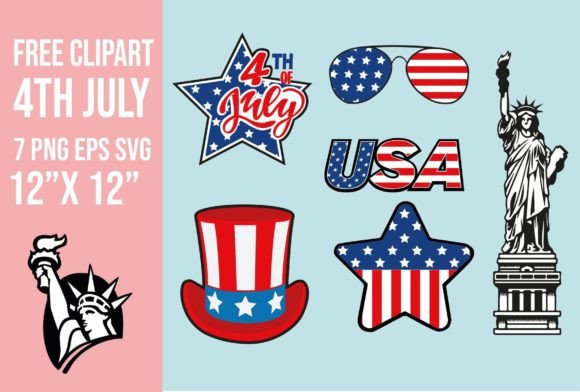
In contrast, PNG (Portable Network Graphics) files with transparent backgrounds are essential for digital composition. While they are raster images (made of pixels) and have a fixed resolution, high-quality PNGs included in professional bundles often feature dimensions around 12 x 12 inches at 300 DPI. This resolution is sufficient for most home printing needs, including scrapbooking pages, party invitations, and nursery art. The transparency is key; it allows you to overlay a "Happy 4th" text graphic onto a textured background photo without a distracting white box surrounding the letters. However, unlike vectors, enlarging a PNG beyond its original dimensions will result in blurriness.
EPS (Encapsulated PostScript) files remain the gold standard for professional print shops and users of Adobe Illustrator or CorelDRAW. These are also vector files but are often preferred in traditional publishing workflows. If you are sending your Independence Day designs to a commercial printer for large banners or high-volume brochures, providing an EPS file ensures the highest fidelity. For the average hobbyist using free software like Inkscape, SVG is usually sufficient, but having EPS options future-proofs your asset library for more advanced projects.
Comparing Bundled Collections Against Single-Image Downloads
When sourcing 4th of July clipart, you generally have two options: purchasing individual design elements or acquiring a curated bundle. While buying single images might seem cost-effective if you only need one specific icon, a bundled set of seven or more coordinated elements offers distinct advantages in terms of design cohesion and workflow efficiency.
A well-curated bundle ensures that all elements share a consistent artistic style. For example, if you are designing a suite of party materials—invitations, cupcake toppers, and welcome signs—using clipart from different artists can result in a disjointed look where line weights, color palettes, and shading techniques clash. A single ZIP folder containing a matched set guarantees that the fireworks, bunting, stars, and typography all feel like they belong to the same family. This consistency is vital for branding, especially for businesses creating social media content or blog headers where visual identity matters.
Furthermore, bundles provide flexibility for mixed-media projects. Consider a digital scrapbooker who wants to create a layout about a family barbecue. They might need a realistic grill illustration, a whimsical sparkler, and a vintage-style flag. A diverse set allows for layering and composition that a single image cannot achieve. It enables the creator to build scenes rather than just placing isolated objects. For web designers, having a set allows for the creation of custom icons for navigation menus or blog post dividers that maintain a uniform theme throughout the site.
Practical Applications and Workflow Compatibility
The utility of Independence Day graphics extends far beyond simple decoration. The suitability of a specific clipart set depends heavily on your intended application and the tools you use daily.
- Cutting Machines and Vinyl Crafts: If you use Cricut Design Space or Silhouette Studio, verify that the SVG files are layered correctly. High-quality sets allow you to ungroup elements, change colors individually, and weld shapes. This is critical for multi-color vinyl projects where each color requires a separate cut mat. Ensure the files are compatible with your machine's firmware; most modern machines handle standard SVGs well, but complex paths may require simplification in some software.
- Digital Scrapbooking and Printing: For those working in programs like Photoshop, Canva, or Procreate, the inclusion of high-resolution PNGs is paramount. The 12 x 12 inch dimension mentioned in many standard bundles aligns perfectly with traditional scrapbook paper sizes. This eliminates the need for resizing, which can degrade image quality. Transparent backgrounds allow for seamless integration into existing layouts without tedious background removal.
- Web and Blog Design: Digital marketers and bloggers often need lightweight graphics that load quickly but look sharp on retina displays. SVGs are ideal here because they render crisply on any screen size and have smaller file sizes compared to high-res PNGs. They can be easily styled with CSS for hover effects or color changes, adding interactivity to your 4th of July themed content.
- Commercial Products: If you intend to sell physical items like stickers, mugs, or tote bags featuring these designs, check the licensing terms carefully. Most premium bundles allow for commercial use on physical end-products, but restrictions often apply to reselling the digital files themselves. Using vector files ensures your product looks professional regardless of the substrate size.
Limitations and Decision Factors
While a versatile clipart set is a powerful tool, it is not a universal solution for every scenario. Understanding the limitations helps manage expectations and prevents frustration during the design process.
First, consider the complexity of the design. Some Independence Day clipart features highly detailed illustrations with thousands of anchor points. While beautiful, these can be difficult to weed (remove excess vinyl) if you are cutting intricate details out of adhesive vinyl with a basic machine. For beginners, simpler designs with fewer layers are often more practical. Conversely, if you are using a high-end printer for sublimation, highly detailed vectors yield superior results.
Second, evaluate your software proficiency. Working with AI-vector files or EPS formats requires a steeper learning curve and access to professional-grade software like Adobe Illustrator. If you rely solely on drag-and-drop platforms or basic cutting software, sticking to pre-flattened SVGs or PNGs may save you time. Attempting to edit complex vector nodes without the proper skills can lead to distorted images.
Finally, consider the aesthetic fit. Patriotic themes range from rustic farmhouse styles with distressed textures to modern minimalist geometric patterns. Ensure the specific style of the clipart matches your project's tone. A whimsical, hand-drawn set might be perfect for a children's party invitation but inappropriate for a formal corporate newsletter.
Making the Right Choice for Your Project
Ultimately, the decision to invest in a specific set of 4th of July clipart should be driven by your immediate project needs and your long-term creative goals. If you frequently create seasonal content, having a reliable library of vector graphics saves significant time compared to searching for free, low-quality alternatives every year. The ability to scale, recolor, and repurpose elements across different mediums—from a blog header to a physical banner—offers a high return on investment.
Before finalizing your selection, review the file contents to ensure they match your hardware capabilities. Confirm that your cutting machine accepts the provided SVG version and that your design software can handle the EPS files if needed. By prioritizing format compatibility, resolution quality, and stylistic consistency, you can ensure that your Independence Day projects stand out with professionalism and clarity. Whether you are a seasoned designer or a DIY enthusiast, the right digital assets act as the building blocks for memorable and visually striking celebrations.